Screen capture apps record every activity occurring on the screen to describe problems or share information. It records cursor activity on the screen, including cursor actions. Providing a written description of anything takes more time. Video capture apps easily resolve these problems. Screen recording is very useful for many occasions. This recording is available on every device these days. Regarding information related to screen recording and screen capture, the objective of this article is to provide useful insights to anyone looking to capture and share their experiences. Check out information about screen recording software.
What is Screen Recording?
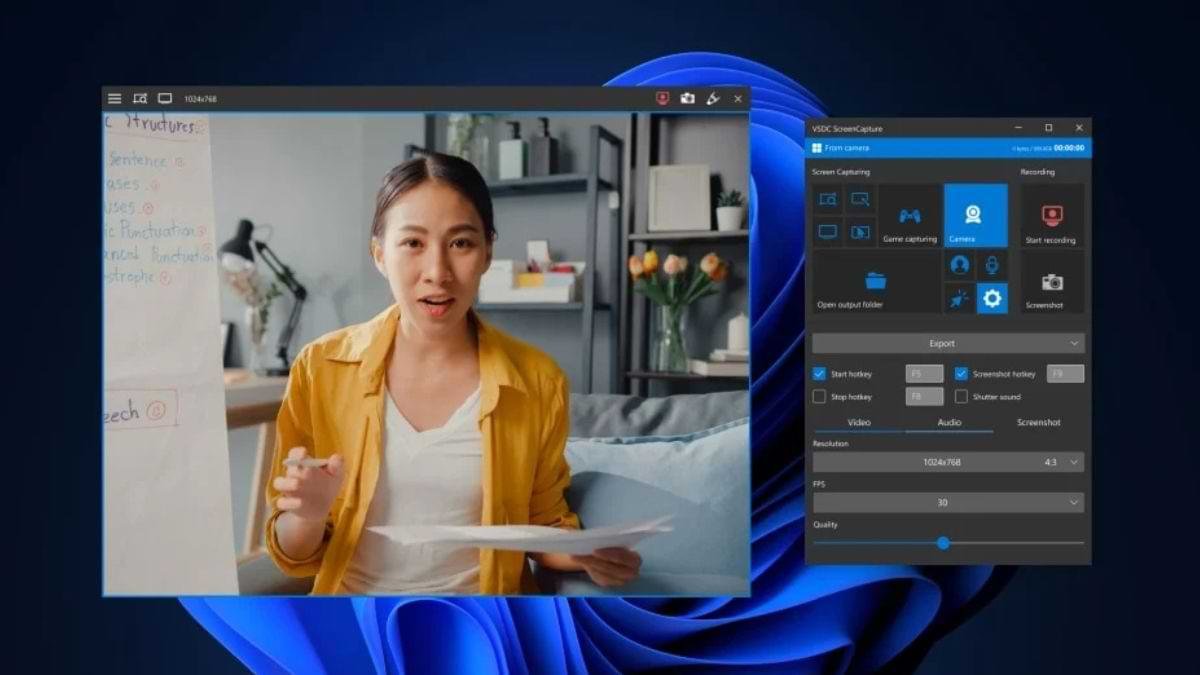
Screen recording is a process that records the activity taking place on the screen. Unlike screenshots, these provide an accurate and dynamic way to explain processes, demonstrate video workflows, and troubleshoot real-world problems. Users rely on screen recorders. These tools are designed to convert screen activity into shareable video content. These tools are widely used for employee training, SaaS support, and product tutorials.
Why Screen Recording Matters in Modern Workflows?
Clear and effective communication is essential in a successful business, but traditional methods such as documents and emails are no longer adequate for explaining complex problems. This is precisely where screen capturing solves this problem and provides an easy-to-understand option. In addition to lengthy emails or text-filled knowledge-base articles, teams can send step-by-step video responses. This not only resolves customer issues more quickly but also enhances the user experience. Recorded videos in Human Resources and employee training facilitate onboarding, internal documentation, and compliance training. Incorporating screen capture into daily workflows can improve business communication.
Types of Screen Recorders
Screen recorders are primarily divided into two categories:
Desktop Screen Recorders
Desktop screen recorders are best suited for advanced editing, offline use, and long-duration recordings. It is used for webinars, tutorials, and software training.
Chrome Extension Screen Recorders
Chrome extension screen recorders are fast, lightweight, and accessible directly within the browser. This is ideal for customer support, quick tutorials, and team communication.
Best Screen Recording Software
Here are the best Screen Recording Software solutions
Loom
Price: $18 per month per user
Loom is a screen recording software that offers an excellent option for fast recording and sharing. This is a popular screen recording tool that features the ability to record voice, camera, and screen simultaneously. It is used to instantly record meetings, tutorials, and presentations. Loom is available for free for 25 videos of five minutes each. Its price starts at $18 per month per user for unlimited video and recordings. Using Loom is not difficult; you can perform minor edits directly within the browser or simply copy the link to share the video.
Key Features of Loom
- Simultaneous screen/webcam capture
- Instant cloud hosting
- AI-powered editing (trimming, filler word removal)
- Viewer insights
- Engagement tools like emoji reactions and comments
Camtasia (Windows, Mac)
Price: $39/year
Camtasia is a popular screen recording and video editing software. Its video capture interface is simple. It can be determined whether or not a webcam and microphone, along with capturing capabilities, are included. Camtasia provides excellent tutorial videos for those who face difficulties using its editing tools. It is used specifically for YouTube content, tutorials, and educational videos. Animations, captions, zoom effects, and transitions can be easily added to this.
Key Features Of Camtasia
- high-quality screen/camera recording
- drag-and-drop editing
- AI-powered enhancements (scripts, avatars, noise removal)
- interactive quizzes
- pre-built templates
OBS Studio
Price: Free
OBS Studio is one of the best screen recording software for advanced recording tools and live streaming. OBS is a screen recording software used for live streaming and screen recording. This is very popular among gamers, YouTubers, and live streamers. It offers advanced features such as multi-source recording, an audio mixer, scene switching, and high-quality video capture. Its live streaming menu features 85 platforms, including popular sites such as YouTube, Facebook Live, and Twitch. Its biggest advantage is that it is completely free.
Key Features of OBS Studio
- High-definition screen capture
- Customizable scene composition
- Multiple audio source mixing
- Robust plugin support
Descript
Price: $24/person/month
Descript is one of the best screen recorders for automated transcription and AI. This is primarily known for video and audio transcription and editing. High-quality transcriptions combined with AI create a powerful video. It is free for up to one hour of recording and transcription per month. Upgrading to its Hobbyist plan starts at $24 per person per month, which includes up to 10 hours of recording and transcription, as well as 400 AI credits per month.
Key Features of Descript
- Text-based editing
- Automatic AI transcription
- Filler word removal
- Studio-quality sound enhancement
- Built-in screen/webcam overlay customization
Screen Studio
Price: $29/month
Screen Studio is a professional and highly automated video recording software. It has been designed specifically for creating demos, tutorials, and marketing videos. Screen recordings can be transformed into high-quality videos with effects such as zooming, cursor movement, and smoothing. It is primarily popular among Mac users. Screen Studio pricing starts at $29 per month, while the annual plan for up to 3 Mac devices starts at $9 per month.
Key Features of Screen Studio
- Automatic zoom-and-pan
- Smooth mouse movement enhancement
- Instant background customization
Tella
Price: $13/user/month
Tella is a modern screen recording and video editing tool, available specifically as a web app, Chrome extension, and Mac (macOS) app. This is one of the best screen recording software options for both beginners and those requiring advanced editing capabilities. Thanks to the extreme simplicity of the Chrome extension and Mac app, screen recording on any device becomes incredibly easy and fast. Its starting price begins at $13 per user per month.
Key Features of Tella
- Drag-and-drop task management
- Custom checklists, due dates
- File attachments
Finding the Best Screen Recorder Software
Screen recording depends on the software you choose. The right tool captures high-quality video. Whether you are a content creator or a teacher, it also helps significantly in boosting productivity. When choosing screen recording software, always prioritize various features such as suitable recording settings, advanced functionalities, and audio recording options. Furthermore, if you opt for a free screen recorder, always prioritize selecting your preferred audio source for audio recording. Before making any decision, consider the necessary functionality and specific requirements. Take advantage of free trials to explore various software.